2018/05/09
Azure上の仮想マシン、どの物理マシン上で動いているのかなー
下記レジストリ下で、調べられます。
同様に、ホストOSのバージョンとかもあります。
■レジストリ
HKEY_LOCAL_MACHINE¥SOFTWARE¥Microsoft¥Virtual Machine¥Guest¥Parameters
■キー
PhysicalHostName
これが regedt32.exeでも見られるし、reg.exeでも
===
reg query "HKEY_LOCAL_MACHINE¥SOFTWARE¥Microsoft¥Virtual Machine¥Guest¥Parameters" /v PhysicalHostName
===
取れるし、PowerShellでも取れる。
なのに、C#のプログラムから取れない・・・。
色々試行錯誤しました。レジストリのパーミッション調べたりして。
結果、VisualStudioの"Platform Target(プラットフォーム ターゲット)"を"Any CPU"にしていても、"Prefer 32-bit(32 ビットの優先)"というチェックボックスにチェックが入っていると、32bitアプリとして動いてしまうことが原因、と判明。このチェックボックス、デフォルトでチェックが付いているのです。。
64 bit Windows OS下では、レジストリは32bitアプリと64bitアプリとで見にいくところが違っているから注意して、ってのは見ていたのですが"Platform Target"が"Any CPU"なんだから、64bit OS上で動かしているわけだし64bitアプリとして動いているに決まってんだろ、としていたのが敗因でした。。

2016/12/17
nvidia on Azure、PCoIP接続 その6

ホストアドレスにAzure上の仮想マシンのアドレスを入力し[次へ]

と出ますがめげずに[安全で無い接続の開始]

仮想マシンに設定した情報で[ログイン]

デスクトップを選択、ここでは NVTEST を選択し[接続]

無事、PCoIPクライアントから仮想マシンに接続!
nvidia on Azure、PCoIP接続編 おしまい。
nvidia on Azure、PCoIP接続 その5
Azure上のNSG (Network Security Group) で PCoIP を通せるようにします。

具体的には、NSGの Inbound security rule に2つのルールを追加します。
上図で赤丸した箇所をクリック。

上図で赤丸した箇所をクリックすると、ルールの記述ができます。
2つのルールの順番はどっちが最初でも後でも大丈夫です。
1つめが画面転送プロトコルのPCoIP自体。
TCP/UDP 両方とも Port番号 4172 を通過させます。

2つめがPCoIPが認証時に利用するhttpsを通過させます。
ここまででAzure上の設定はオシマイ。
続く・・・
nvidia on Azure、PCoIP接続 その4

(下記作業を継続するためのアイコンが表示されなていなかったら)c:¥Program Files (x86)¥Teradici¥PCoIP Agent¥bin¥pcoip_control_panel.exe を起動します。

緑っぽいPCoIPアイコンを右クリック。

Licensingを選択。

ここで、試用版申込みでメアド宛に送られてきたActivation Codeを入力します。
※入力の仕方にコツがいるようです。筆者環境では、tab キーを使うとうまく入力ができませんでした。
[Activate]ボタンを押せたらCloud Access Software Graphics Agent、いわゆるPCoIP Agentのインストールが完了です。
次に、PCoIPクライアントをインストールします。
PCoIPの真の威力を発揮するためには、専用のハードウェアを使ったゼロクライアントが優れているのですがその話はまた別途。専用のハードウェアといっても1台数万円で買えます。
http://www.teradici.com/product-finder/product-details?productid=1be37e19-64a0-69f0-a533-ff0000f45ce7
http://www.teradici.com/product-finder/product-details?productid=bde37e19-64a0-69f0-a533-ff0000f45ce7
Windows, Mac OS, Chrome OS, Android, iOS 用があります。
どれか好きなのをご用意ください。
ここでは Mac OS 版を使います。
続く・・・
nvidia on Azure、PCoIP接続 その3

ドライバーのインストールが成功すると、デバイスマネージャーで NVIDIA Tesla M60 が確認できます。
もうこれで、Microsoft Remote Desktopから、つまり画面転送がRDPであれば、この仮想マシン上で、DirectXやらOpenGLやらOpenCLで遊ぶことができます。
さて、PCoIPで遊ぶ準備をしましょうか。
teradici社の Cloud Access Softwareを使います。ここでは試用版で。
http://connect.teradici.com/cas-trial
Which version of ... の箇所で
[Graphics Edition for Windows]を選択。あとは適切に情報を入れでGo!

すると、指定したメアド宛にバイナリーのダウンロードURLやら試用のためのキーが送られてきます。

Cloud Access Software Graphics Agent、上記ファイル群だと S-GRA-Win_2.6.2.zip が該当、をAzure上のnvidiaのドライバーをインストールした仮想マシンにインストールします。
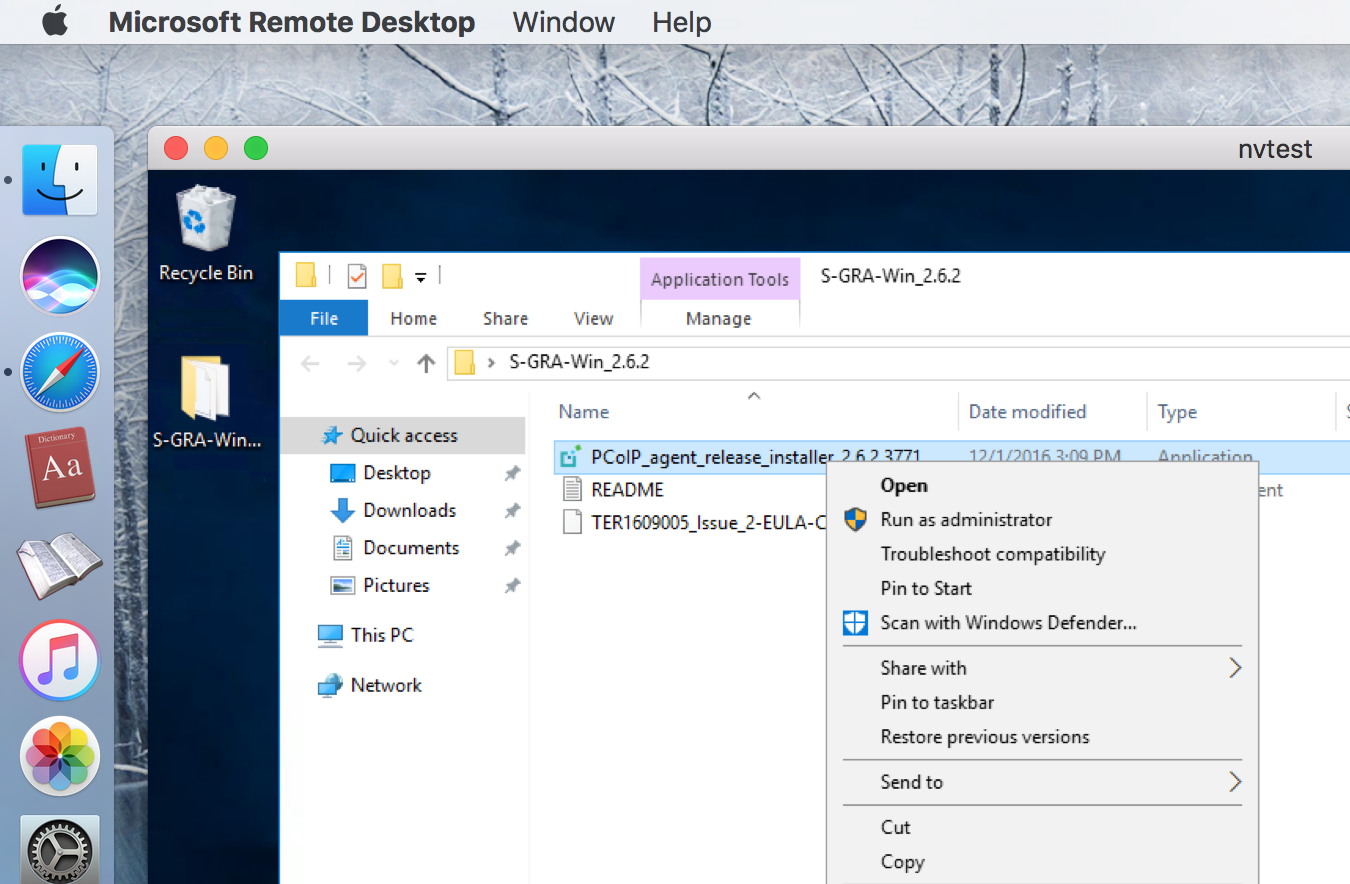
なんとなく念のため Run as administrator で実行。

無事インストール完了でリブートです。
続く・・・
nvidia on Azure、PCoIP接続 その2

この順序で仮想マシンに割り当てられるPublic IPを固定します。
この作業は必須ではありませんが、当用途では固定したほうが便利です。
まずは、仮想マシンの初期設定を行いましょう。

Windows OSだったらOS標準のものを。
Mac OSだったら、App Storeからコレを使います。

今までの情報を元に、各種情報を。

[Start]ボタンで仮想マシンに接続しにいきます。

仮想マシンに接続したら、仮想マシンの中からブラウザで
https://docs.microsoft.com/en-us/azure/virtual-machines/virtual-machines-windows-n-series-driver-setup
を開き、nvidiaのドライバーをダウンロードおよびインストールします。

続く・・・
nvidia on Azure、PCoIP接続 その1
Azure VM NVシリーズ展開。NV series deploy
まずは下準備。

仮想マシンを作ります。
ここではWindows Server 2016 Datacenter を選びます。


(そのうちこの注意点は不要になると思われますが)VM disk typeはHDD
Locationは、ここでは Southeast Asia を選びます。
※ご参考 Locationごとに使えるサービスの一覧はここで見られます。
https://azure.microsoft.com/ja-jp/regions/services/

NVシリーズのどれかを選びます。
[Select]をポチッと。


特に注意点はありません。
ここでは適当に入れています。ご自分の趣味に応じて味付けください。

[Ok]ポチしてしばらくすると仮想マシンができあがります。
続く・・・
まずは下準備。

仮想マシンを作ります。
ここではWindows Server 2016 Datacenter を選びます。


(そのうちこの注意点は不要になると思われますが)VM disk typeはHDD
Locationは、ここでは Southeast Asia を選びます。
※ご参考 Locationごとに使えるサービスの一覧はここで見られます。
https://azure.microsoft.com/ja-jp/regions/services/
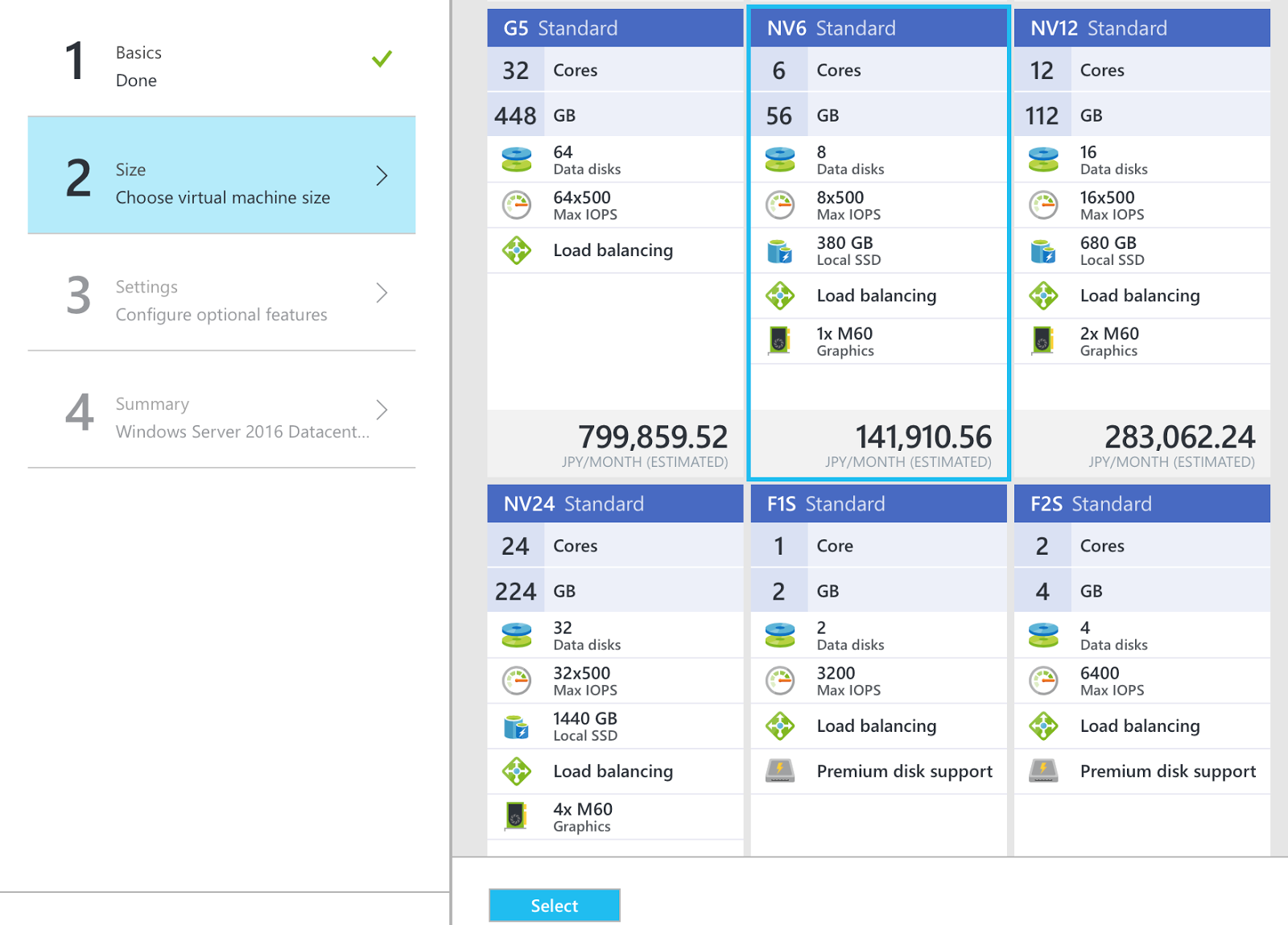
NVシリーズのどれかを選びます。
[Select]をポチッと。


特に注意点はありません。
ここでは適当に入れています。ご自分の趣味に応じて味付けください。

[Ok]ポチしてしばらくすると仮想マシンができあがります。
続く・・・
2015/11/10
Azure CLI で Azure ARM:これだけ!シリーズ その8
$ azure network gateway local-network create -g g-TokyoIaaS -n home
-a 10.1.0.0/16 -l JapanEast -i 11.111.111.111
info: Executing command network gateway local-network create
+ Looking up local network gateway "home"
+ Creating local network gateway "home"
+ Looking up local network gateway "home"
data: Id : /subscriptions/XXX/resourceGroups/g-TokyoIaaS/providers/Microsoft.Network/localNetwo
rkGateways/home
data: Name : home
data: Type : Microsoft.Network/localNetworkGateway
s
data: Location : japaneast
data: Provisioning state : Succeeded
data: IP Address : 11.111.111.111
data: Address prefixes:
data: 10.1.0.0/16
info: network gateway local-network create command OK
-a 10.1.0.0/16 -l JapanEast -i 11.111.111.111
info: Executing command network gateway local-network create
+ Looking up local network gateway "home"
+ Creating local network gateway "home"
+ Looking up local network gateway "home"
data: Id : /subscriptions/XXX/resourceGroups/g-TokyoIaaS/providers/Microsoft.Network/localNetwo
rkGateways/home
data: Name : home
data: Type : Microsoft.Network/localNetworkGateway
s
data: Location : japaneast
data: Provisioning state : Succeeded
data: IP Address : 11.111.111.111
data: Address prefixes:
data: 10.1.0.0/16
info: network gateway local-network create command OK
2015/11/01
Windows10 で、USB RJ45 コンソールケーブル
結果、最新のデバイスドライバを入れればokでした。
http://www.ftdichip.com/Drivers/VCP.htm
以下、経緯。
Windows10 にしたら、TeraTerm からルータとかネットワーク機器へのシリアルコンソール接続ができなくなってしまいました。
筆者は、FTDI 社のチップセットを使った USB RJ45 コンソールケーブルを利用しています。
plug & play で、Windows10 に標準で入っているデバイスドライバでも、あたかも正常動作しているように見えるのですが・・・
http://www.ftdichip.com/Drivers/VCP.htm
以下、経緯。
Windows10 にしたら、TeraTerm からルータとかネットワーク機器へのシリアルコンソール接続ができなくなってしまいました。
筆者は、FTDI 社のチップセットを使った USB RJ45 コンソールケーブルを利用しています。
plug & play で、Windows10 に標準で入っているデバイスドライバでも、あたかも正常動作しているように見えるのですが・・・
2015/09/02
Azure CLI で Azure ARM:これだけ!シリーズ その7
$ azure network nsg create -g g-TokyoIaaS -n nsg-standard -l JapanEast
info: Executing command network nsg create
+ Looking up the network security group "nsg-standard"
+ Creating a network security group "nsg-standard"
+ Looking up the network security group "nsg-standard"
data: Id : /subscriptions/XXX/resourceGroups/g-TokyoIaaS/providers/Microsoft.Network/networkSecurityGroups/nsg-standard
data: Name : nsg-standard
data: Type : Microsoft.Network/networkSecurityGroups
data: Location : japaneast
data: Provisioning state : Succeeded
data: Security group rules:
data: Name Source IP Source Port Destination IP Destination Port Protocol Direction Access Priority
data: ----------------------------- ----------------- ----------- -------------- ---------------- -------- --------- ------ --------
data: AllowVnetInBound VirtualNetwork * VirtualNetwork * * Inbound Allow 65000
data: AllowAzureLoadBalancerInBound AzureLoadBalancer * * * * Inbound Allow 65001
data: DenyAllInBound * * * * * Inbound Deny 65500
data: AllowVnetOutBound VirtualNetwork * VirtualNetwork * * Outbound Allow 65000
data: AllowInternetOutBound * * Internet * * Outbound Allow 65001
data: DenyAllOutBound * * * * * Outbound Deny 65500
info: network nsg create command OK
Name
Source IP Source Port
Destination IP Destination Port
Protocol Direction Access Priority
AllowVnetInBound
VirtualNetwork *
VirtualNetwork *
* Inbound Allow 65000
AllowAzureLoadBalancerInBound
AzureLoadBalancer *
* *
* Inbound Allow 65001
DenyAllInBound
* *
* *
* Inbound Deny 65500
AllowVnetOutBound
VirtualNetwork *
VirtualNetwork *
* Outbound Allow 65000
AllowInternetOutBound
* *
Internet *
* Outbound Allow 65001
DenyAllOutBound
* *
* *
* Outbound Deny 65500
info: Executing command network nsg create
+ Looking up the network security group "nsg-standard"
+ Creating a network security group "nsg-standard"
+ Looking up the network security group "nsg-standard"
data: Id : /subscriptions/XXX/resourceGroups/g-TokyoIaaS/providers/Microsoft.Network/networkSecurityGroups/nsg-standard
data: Name : nsg-standard
data: Type : Microsoft.Network/networkSecurityGroups
data: Location : japaneast
data: Provisioning state : Succeeded
data: Security group rules:
data: Name Source IP Source Port Destination IP Destination Port Protocol Direction Access Priority
data: ----------------------------- ----------------- ----------- -------------- ---------------- -------- --------- ------ --------
data: AllowVnetInBound VirtualNetwork * VirtualNetwork * * Inbound Allow 65000
data: AllowAzureLoadBalancerInBound AzureLoadBalancer * * * * Inbound Allow 65001
data: DenyAllInBound * * * * * Inbound Deny 65500
data: AllowVnetOutBound VirtualNetwork * VirtualNetwork * * Outbound Allow 65000
data: AllowInternetOutBound * * Internet * * Outbound Allow 65001
data: DenyAllOutBound * * * * * Outbound Deny 65500
info: network nsg create command OK
以下、上記のSecurity group rules (default) を整形したもの。
Name
Source IP Source Port
Destination IP Destination Port
Protocol Direction Access Priority
AllowVnetInBound
VirtualNetwork *
VirtualNetwork *
* Inbound Allow 65000
AllowAzureLoadBalancerInBound
AzureLoadBalancer *
* *
* Inbound Allow 65001
DenyAllInBound
* *
* *
* Inbound Deny 65500
AllowVnetOutBound
VirtualNetwork *
VirtualNetwork *
* Outbound Allow 65000
AllowInternetOutBound
* *
Internet *
* Outbound Allow 65001
DenyAllOutBound
* *
* *
* Outbound Deny 65500
2015/08/26
Azure CLI で Azure ARM:これだけ!シリーズ その6
$ azure availset create -g g-TokyoIaaS -l JapanEast -n avset-for-web
info: Executing command availset create
+ Looking up the availability set "avset-for-web"
+ Creating availability set "avset-for-web"
info: availset create command OK
$ azure vm create -g g-TokyoIaaS -l JapanEast -y Windows -n web14 -u hogeadmin -p hogepassword -f nic-web14 -z Standard_D1 -r avset-for-web -o storageaccountname -R vhds -d web14.vhd --image-urn MicrosoftWindowsServer:WindowsServer:2012-R2-Datacenter:latest
info: Executing command vm create
+ Looking up the VM "web14"
info: Using the VM Size "Standard_D1"
info: The [OS, Data] Disk or image configuration requires storage account
+ Looking up the storage account storageaccountname
+ Looking up the availability set "avset-for-web"
info: Found an Availability set "avset-for-web"
+ Looking up the NIC "nic-web14"
info: Found an existing NIC "nic-web14"
info: Found an IP configuration with virtual network subnet id "/subscriptions/XXX/resourceGroups/g-TokyoIaaS/providers/Microsoft.Network/virtualNetworks/vNet-Tokyo/subnets/subnet-172.16.1" in the NIC "nic-web14"
info: This is an NIC without publicIP configured
+ Creating VM "web14"
info: vm create command OK
info: Executing command vm create
+ Looking up the VM "web14"
info: Using the VM Size "Standard_D1"
info: The [OS, Data] Disk or image configuration requires storage account
+ Looking up the storage account storageaccountname
+ Looking up the availability set "avset-for-web"
info: Found an Availability set "avset-for-web"
+ Looking up the NIC "nic-web14"
info: Found an existing NIC "nic-web14"
info: Found an IP configuration with virtual network subnet id "/subscriptions/XXX/resourceGroups/g-TokyoIaaS/providers/Microsoft.Network/virtualNetworks/vNet-Tokyo/subnets/subnet-172.16.1" in the NIC "nic-web14"
info: This is an NIC without publicIP configured
+ Creating VM "web14"
info: vm create command OK
2015/08/25
Azure CLI で Azure ARM:これだけ!シリーズ その5
$ azure network nic address-pool add -g g-TokyoIaaS -l lb-web -a lbwebAddressPool -n nic-web14
info: Executing command network nic address-pool add
+ Looking up the network interface "nic-web14"
+ Looking up the load balancer "lb-web"
+ Updating network interface "nic-web14"
info: network nic address-pool add command OK
$ azure network lb inbound-nat-rule create -g g-TokyoIaaS -l lb-web -f 50014 -b 3389 -i frontend-Web -n natruleFor-nic-web14
info: Executing command network lb inbound-nat-rule create
+ Looking up the load balancer "lb-web"
+ Updating load balancer "lb-web"
+ Looking up the load balancer "lb-web"
data: Id : /subscriptions/XXX/resourceGroups/g-TokyoIaaS/providers/Microsoft.Network/loadBalancers/lb-web/inboundNatRules/natruleFor-nic-web14
data: Type : Microsoft.Network/loadBalancers/inboundNatRules
data: Name : natruleFor-nic-web14
data: Provisioning state : Succeeded
data: Protocol : Tcp
data: Frontend port : 50014
data: Backend port : 3389
data: Enable floating IP : false
data: Idle timeout in minutes : 4
data: Frontend IP configuration : /subscriptions/XXX/resourceGroups/g-TokyoIaaS/providers/Microsoft.Network/loadBalancers/lb-web/frontendIPConfigurations/frontend-Web
data:
info: network lb inbound-nat-rule create command OK
$ azure network nic inbound-nat-rule add -g g-TokyoIaaS -l lb-web -r natruleFor-nic-web14 -n nic-web14
info: Executing command network nic inbound-nat-rule add
+ Looking up the network interface "nic-web14"
+ Looking up the load balancer "lb-web"
+ Updating network interface "nic-web14"
info: network nic inbound-nat-rule add command OK
2015/08/18
複数のサブスクリプションから、利用するサブスクリプションを選択 Azure CLI編
■ログオン
> azure login
info: Executing command login
warn: Please note that currently you can login only via Microsoft organizational account or service principal. For instructions on how to set them up, please read http://aka.ms/Dhf67j.
Username: hoge@hoge.com
Password:
-info: Added subscription Plan XXX
info: Added subscription Plan YYYinfo: Added subscription Plan ZZZ
info: Setting subscription "Plan YYY" as default
+
info: login command OK
■ログオンしたアカウントで使えるサブスクリプションの一覧を表示
>azure account list
info: Executing command account list
data: Name Id Tenant Id Current
data: ------------------------------------ ------------------------------------ ------------------------------------ -------
data: Plan XXX XXXXXXXX-XXXX-XXXX-XXXX-XXXXXXXXXXXX XaXaXaXa-XaXa-XaXa-XaXa-XaXaXaXaXaXa false
data: Plan YYY YYYYYYYY-YYYY-YYYY-YYYY-YYYYYYYYYYYY YaYaYaYa-YaYa-YaYa-YaYa-YaYaYaYaYaYa true
data: Plan ZZZ ZZZZZZZZ-ZZZZ-ZZZZ-ZZZZ-ZZZZZZZZZZZZ ZaZaZaZa-ZaZa-ZaZa-ZaZa-ZaZaZaZaZaZa false
info: account list command OK
info: Setting subscription to "Plan ZZZ" with id "ZZZZZZZZ-ZZZZ-ZZZZ-ZZZZ-ZZZZZZZZZZZZ".
info: Changes saved
info: account set command OK
> azure login
info: Executing command login
warn: Please note that currently you can login only via Microsoft organizational account or service principal. For instructions on how to set them up, please read http://aka.ms/Dhf67j.
Username: hoge@hoge.com
Password:
-info: Added subscription Plan XXX
info: Added subscription Plan YYYinfo: Added subscription Plan ZZZ
info: Setting subscription "Plan YYY" as default
+
info: login command OK
>azure account list
info: Executing command account list
data: Name Id Tenant Id Current
data: ------------------------------------ ------------------------------------ ------------------------------------ -------
data: Plan XXX XXXXXXXX-XXXX-XXXX-XXXX-XXXXXXXXXXXX XaXaXaXa-XaXa-XaXa-XaXa-XaXaXaXaXaXa false
data: Plan YYY YYYYYYYY-YYYY-YYYY-YYYY-YYYYYYYYYYYY YaYaYaYa-YaYa-YaYa-YaYa-YaYaYaYaYaYa true
data: Plan ZZZ ZZZZZZZZ-ZZZZ-ZZZZ-ZZZZ-ZZZZZZZZZZZZ ZaZaZaZa-ZaZa-ZaZa-ZaZa-ZaZaZaZaZaZa false
info: account list command OK
上記で、
Current 列が true
となっているサブスクリプション(Plan YYY)が、現在コンソールで操作対象になっているサブスクリプション。
■操作対象にするサブスクリプションを変更
たとえば、Plan ZZZ に変更する場合、
>azure account set ZZZZZZZZ-ZZZZ-ZZZZ-ZZZZ-ZZZZZZZZZZZZ
info: Executing command account setinfo: Setting subscription to "Plan ZZZ" with id "ZZZZZZZZ-ZZZZ-ZZZZ-ZZZZ-ZZZZZZZZZZZZ".
info: Changes saved
info: account set command OK
# subscription
2015/07/28
複数のサブスクリプションから、利用するサブスクリプションを選択 PowerShell編
■ログオン
PS> Add-AzureAccount
■ログオンしたアカウントで使えるサブスクリプションの一覧を表示
PS> Get-AzureSubscription
SubscriptionId : XXXXXXXX-XXXX-XXXX-XXXX-XXXXXXXXXXXX
SubscriptionName : Plan XXX
Environment : AzureCloud
SupportedModes : AzureResourceManager,AzureServiceManagement
DefaultAccount : hoge@hoge.com
Accounts : {hoge@hoge.com}
IsDefault : False
IsCurrent : False
CurrentStorageAccountName :
TenantId : XaXaXaXa-XaXa-XaXa-XaXa-XaXaXaXaXaXa
SubscriptionId : YYYYYYYY-YYYY-YYYY-YYYY-YYYYYYYYYYYY
SubscriptionName : Plan YYY
Environment : AzureCloud
SupportedModes : AzureServiceManagement,AzureResourceManager
DefaultAccount : hoge@hoge.com
Accounts : {hoge@hoge.com}
IsDefault : True
IsCurrent : True
CurrentStorageAccountName :
TenantId : YaYaYaYa-YaYa-YaYa-YaYa-YaYaYaYaYaYa
SubscriptionId : ZZZZZZZZ-ZZZZ-ZZZZ-ZZZZ-ZZZZZZZZZZZZ
SubscriptionName : Plan ZZZ
Environment : AzureCloud
SupportedModes : AzureServiceManagement,AzureResourceManager
DefaultAccount : hoge@hoge.com
Accounts : {hoge@hoge.com}
IsDefault : False
IsCurrent : False
CurrentStorageAccountName :
TenantId : ZaZaZaZa-ZaZa-ZaZa-ZaZa-ZaZaZaZaZaZa
PS> Add-AzureAccount
■ログオンしたアカウントで使えるサブスクリプションの一覧を表示
PS> Get-AzureSubscription
SubscriptionId : XXXXXXXX-XXXX-XXXX-XXXX-XXXXXXXXXXXX
SubscriptionName : Plan XXX
Environment : AzureCloud
SupportedModes : AzureResourceManager,AzureServiceManagement
DefaultAccount : hoge@hoge.com
Accounts : {hoge@hoge.com}
IsDefault : False
IsCurrent : False
CurrentStorageAccountName :
TenantId : XaXaXaXa-XaXa-XaXa-XaXa-XaXaXaXaXaXa
SubscriptionId : YYYYYYYY-YYYY-YYYY-YYYY-YYYYYYYYYYYY
SubscriptionName : Plan YYY
Environment : AzureCloud
SupportedModes : AzureServiceManagement,AzureResourceManager
DefaultAccount : hoge@hoge.com
Accounts : {hoge@hoge.com}
IsDefault : True
IsCurrent : True
CurrentStorageAccountName :
TenantId : YaYaYaYa-YaYa-YaYa-YaYa-YaYaYaYaYaYa
SubscriptionId : ZZZZZZZZ-ZZZZ-ZZZZ-ZZZZ-ZZZZZZZZZZZZ
SubscriptionName : Plan ZZZ
Environment : AzureCloud
SupportedModes : AzureServiceManagement,AzureResourceManager
DefaultAccount : hoge@hoge.com
Accounts : {hoge@hoge.com}
IsDefault : False
IsCurrent : False
CurrentStorageAccountName :
TenantId : ZaZaZaZa-ZaZa-ZaZa-ZaZa-ZaZaZaZaZaZa
上記で、
IsCurrent : True
となっているサブスクリプション(Plan YYY)が、現在コンソールで操作対象になっているサブスクリプション。
■操作対象にするサブスクリプションを変更
たとえば、Plan ZZZ に変更する場合、
PS> Select-AzureSubscription -SubscriptionId ZZZZZZZZ-ZZZZ-ZZZZ-ZZZZ-ZZZZZZZZZZZZ
# subscription
2015/07/08
障害ドメイン(FD)と更新ドメイン(UD)
https://azure.microsoft.com/en-us/documentation/articles/virtual-machines-manage-availability/
===
Each virtual machine in your Availability Set is assigned an Update Domain (UD) and a Fault Domain (FD) by the underlying Azure platform. For a given Availability Set, five non-user-configurable UDs are assigned to indicate groups of virtual machines and underlying physical hardware that can be rebooted at the same time. When more than five virtual machines are configured within a single Availability Set, the sixth virtual machine will be placed into the same UD as the first virtual machine, the seventh in the same UD as the second virtual machine, and so on. The order of UDs being rebooted may not proceed sequentially during planned maintenance, but only one UD will be rebooted at a time.
===
障害ドメイン(FD:Fault Domain)は、対、電源装置の障害やネットワーク装置の障害。
今後主流になるARMでは、可用性セット(Availability Set)ごとに、デフォルトでは3つのFDに、所属する仮想マシンが自動的に分散配置される。
更新ドメイン(UD:Update Domain)は、対、Azureインフラのメンテナンス作業。
可用性セット(Availability Set)ごとに、デフォルトでは5つのUDに、所属する仮想マシンが自動的に分散配置される。
本投稿時点では、可用性セット作成時に限り、以下のような選択ができた。
FDはデフォルト3(2-3で選択)
UDはデフォルト5(1-20で選択)

計画メンテナンス
2015/07/07
Azure CLI で Azure ARM:これだけ!シリーズ その4
$ azure network lb create -g g-TokyoIaaS -l JapanEast -n lb-web
info: Executing command network lb create
+ Looking up the load balancer "lb-web"
+ Creating load balancer "lb-web"
+ Looking up the load balancer "lb-web"
data: Id : /subscriptions/XXX/resourceGroups/g-TokyoIaaS/providers/Microsoft.Network/loadBalancers/lb-web
data: Name : lb-web
data: Type : Microsoft.Network/loadBalancers
data: Location : japaneast
data: Provisioning State : Succeeded
info: network lb create command OK
$ azure network lb frontend-ip create -g g-TokyoIaaS -l lb-web -i PublicIP-W -n frontend-Web
info: Executing command network lb frontend-ip create
+ Looking up the load balancer "lb-web"
+ Looking up the public ip "PublicIP-W"
+ Creating frontend IP configuration "frontend-Web"
+ Looking up the load balancer "lb-web"
data: Id : /subscriptions/XXX/resourceGroups/g-TokyoIaaS/providers/Microsoft.Network/loadBalancers/lb-web/frontendIPConfigurations/frontend-Web
data: Type : Microsoft.Network/loadBalancers/frontendIPConfigurations
data: Name : frontend-Web
data: Provisioning state : Succeeded
data: Public IP address id : /subscriptions/XXX/resourceGroups/g-TokyoIaaS/providers/Microsoft.Network/publicIPAddresses/PublicIP-W
data:
info: network lb frontend-ip create command OK
$ azure network lb address-pool create -g g-TokyoIaaS -l lb-web -n lbwebAddressPool
info: Executing command network lb address-pool create
+ Looking up the load balancer "lb-web"
+ Updating load balancer "lb-web"
+ Looking up the load balancer "lb-web"
data: Id : /subscriptions/XXX/resourceGroups/g-TokyoIaaS/providers/Microsoft.Network/loadBalancers/lb-web/backendAddressPools/lbwebAddressPool
data: Type : Microsoft.Network/loadBalancers/backendAddressPools
data: Name : lbwebAddressPool
data: Provisioning state : Succeeded
data:
info: network lb address-pool create command OK
$ azure network lb frontend-ip create -g g-TokyoIaaS -l lb-web -i PublicIP-W -n frontend-Web
info: Executing command network lb frontend-ip create
+ Looking up the load balancer "lb-web"
+ Looking up the public ip "PublicIP-W"
+ Creating frontend IP configuration "frontend-Web"
+ Looking up the load balancer "lb-web"
data: Id : /subscriptions/XXX/resourceGroups/g-TokyoIaaS/providers/Microsoft.Network/loadBalancers/lb-web/frontendIPConfigurations/frontend-Web
data: Type : Microsoft.Network/loadBalancers/frontendIPConfigurations
data: Name : frontend-Web
data: Provisioning state : Succeeded
data: Public IP address id : /subscriptions/XXX/resourceGroups/g-TokyoIaaS/providers/Microsoft.Network/publicIPAddresses/PublicIP-W
data:
info: network lb frontend-ip create command OK
$ azure network lb address-pool create -g g-TokyoIaaS -l lb-web -n lbwebAddressPool
info: Executing command network lb address-pool create
+ Looking up the load balancer "lb-web"
+ Updating load balancer "lb-web"
+ Looking up the load balancer "lb-web"
data: Id : /subscriptions/XXX/resourceGroups/g-TokyoIaaS/providers/Microsoft.Network/loadBalancers/lb-web/backendAddressPools/lbwebAddressPool
data: Type : Microsoft.Network/loadBalancers/backendAddressPools
data: Name : lbwebAddressPool
data: Provisioning state : Succeeded
data:
info: network lb address-pool create command OK
2015/07/06
Azure CLI で Azure ARM:これだけ!シリーズ その3
$ azure network public-ip create -g g-TokyoIaaS -l JapanEast -d hogeweb -n PublicIP-W
info: Executing command network public-ip create
+ Looking up the public ip "PublicIP-W"
+ Creating public ip address "PublicIP-W"
+ Looking up the public ip "PublicIP-W"
data: Id : /subscriptions/XXX/resourceGroups/g-TokyoIaaS/providers/Microsoft.Network/publicIPAddresses/PublicIP-W
data: Name : PublicIP-W
data: Type : Microsoft.Network/publicIPAddresses
data: Location : japaneast
data: Provisioning state : Succeeded
data: Allocation method : Dynamic
data: Idle timeout : 4
data: Domain name label : hogeweb
data: FQDN : hogeweb.japaneast.cloudapp.azure.com
info: network public-ip create command OK
info: Executing command network public-ip create
+ Looking up the public ip "PublicIP-W"
+ Creating public ip address "PublicIP-W"
+ Looking up the public ip "PublicIP-W"
data: Id : /subscriptions/XXX/resourceGroups/g-TokyoIaaS/providers/Microsoft.Network/publicIPAddresses/PublicIP-W
data: Name : PublicIP-W
data: Type : Microsoft.Network/publicIPAddresses
data: Location : japaneast
data: Provisioning state : Succeeded
data: Allocation method : Dynamic
data: Idle timeout : 4
data: Domain name label : hogeweb
data: FQDN : hogeweb.japaneast.cloudapp.azure.com
info: network public-ip create command OK
$ azure network nic create -g g-TokyoIaaS -l JapanEast -m vNet-Tokyo -k subnet-172.16.1 -a 172.16.1.14 -n nic-web14
info: Executing command network nic create
+ Looking up the network interface "nic-web14"
+ Looking up the subnet "subnet-172.16.1"
+ Creating network interface "nic-web14"
+ Looking up the network interface "nic-web14"
data: Id : /subscriptions/XXX/resourceGroups/g-TokyoIaaS/providers/Microsoft.Network/networkInterfaces/nic-web14
data: Name : nic-web14
data: Type : Microsoft.Network/networkInterfaces
data: Location : japaneast
data: Provisioning state : Succeeded
data: IP configurations:
data: Name : NIC-config
data: Provisioning state : Succeeded
data: Private IP address : 172.16.1.14
data: Private IP Allocation Method : Static
data: Subnet : /subscriptions/XXX/resourceGroups/g-TokyoIaaS/providers/Microsoft.Network/virtualNetworks/vNet-Tokyo/subnets/subnet-172.16.1
data:
info: network nic create command OK
info: Executing command network nic create
+ Looking up the network interface "nic-web14"
+ Looking up the subnet "subnet-172.16.1"
+ Creating network interface "nic-web14"
+ Looking up the network interface "nic-web14"
data: Id : /subscriptions/XXX/resourceGroups/g-TokyoIaaS/providers/Microsoft.Network/networkInterfaces/nic-web14
data: Name : nic-web14
data: Type : Microsoft.Network/networkInterfaces
data: Location : japaneast
data: Provisioning state : Succeeded
data: IP configurations:
data: Name : NIC-config
data: Provisioning state : Succeeded
data: Private IP address : 172.16.1.14
data: Private IP Allocation Method : Static
data: Subnet : /subscriptions/XXX/resourceGroups/g-TokyoIaaS/providers/Microsoft.Network/virtualNetworks/vNet-Tokyo/subnets/subnet-172.16.1
data:
info: network nic create command OK
2015/07/03
計画メンテナンス
https://azure.microsoft.com/en-us/documentation/articles/virtual-machines-planned-maintenance/
以下、計画されたメンテナンスの場合・・・の要約です。
■2種類のメンテナンス手法
仮想マシンに対して与える影響が30秒以内で済む場合と、済まない場合がある。
多くの場合、"Memory-Preserving" という手法で update される。この場合、仮想マシンのリブートなしに30秒以内で済む。update 時、仮想マシンは paused され、その後、ホストに対するメンテナンスが実行される。ホストに対するメンテナンスが終了すると、仮想マシンは resumed される。仮想マシンに対する時刻同期もこのタイミングで自動実施される。
"Memory-Preserving"が適用できない場合もある。その際は、update 時、仮想マシンはシャットダウンされ、その後、ホストマシンに対するメンテナンスが実行される。ホストに対するメンテナンスが終了すると、仮想マシンは開始される。
■可用性セット、Availability Set
まず、可用性セットを組んである仮想マシンが配置されているホスト群からメンテナンスが開始される。なお、仮に1つの仮想マシンしか実行していなかったとしても、可用性セットを組んでいれば、可用性セットが組んであるホスト群に所属する。それが終わってから、可用性セットを組んでいない仮想マシンが配置されているホスト群のメンテナンスが開始される。
可用性セットが組んであれば、その可用性セットに含まれる仮想マシンが所属するホストは、すべてが同時にメンテナンス開始しないように、更新ドメイン(UD)ごとに30分以上の間隔を空けて更新が実施されるように仕込まれている。
障害ドメイン(FD)と更新ドメイン(UD)
■対となるリージョンのメンテナンス
可用性セットを組んでいない仮想マシンのために、対となるリージョンのメンテナンスは同時に実行されないように仕込まれている。対となるリージョンとは、たとえば日本では、東日本リージョンと西日本リージョンが該当する。
※東日本リージョンと西日本リージョンに、それぞれ1仮想マシンを配置し、それら2台の仮想マシンで冗長構成としている場合などを想定。※
■事前通知
可用性セットを組んでいない仮想マシン:1週間前に email で通知。
可用性セットを組んでいる仮想マシン:48時間前に email で通知。
emailは、サブスクリプションのプライマリ email アカウント宛に送られる。
# "Memory-Preserving" で update される場合は、通知されない。
2015/06/30
Azure CLI で Azure ARM:これだけ!シリーズ その2
$ azure storage account create -g g-TokyoIaaS -l JapanEast --type
LRS storageaccountname
info: Executing command storage account create
+ Creating storage account
info: storage account create command OK
$ azure network vnet create -g g-TokyoIaaS -l JapanEast -n vNet-Tokyo -a 172.16.0.0/16
info: Executing command network vnet create
+ Looking up virtual network "vNet-Tokyo"
+ Creating virtual network "vNet-Tokyo"
+ Loading virtual network state
data: Id : /subscriptions/XXX/resourceGroups/g-TokyoIaaS/providers/Microsoft.Network/virtualNetworks/vNet-Tokyo
data: Name : vNet-Tokyo
data: Type : Microsoft.Network/virtualNetworks
data: Location : japaneast
data: ProvisioningState : Succeeded
data: Address prefixes:
data: 172.16.0.0/16
info: network vnet create command OK
$ azure network vnet subnet create -g g-TokyoIaaS -e vNet-Tokyo -n subnet-172.16.1 -a 172.16.1.0/24
info: Executing command network vnet subnet create
+ Looking up the subnet "subnet-172.16.1"
+ Creating subnet "subnet-172.16.1"
+ Looking up the subnet "subnet-172.16.1"
data: Id : /subscriptions/XXX/resourceGroups/g-TokyoIaaS/providers/Microsoft.Network/virtualNetworks/vNet-Tokyo/subnets/subnet-172.16.1
data: Type : Microsoft.Network/virtualNetworks/subnets
data: ProvisioningState : Succeeded
data: Name : subnet-172.16.1
data: Address prefix : 172.16.1.0/24
data:
info: network vnet subnet create command OK
info: Executing command network vnet subnet create
+ Looking up the subnet "subnet-172.16.1"
+ Creating subnet "subnet-172.16.1"
+ Looking up the subnet "subnet-172.16.1"
data: Id : /subscriptions/XXX/resourceGroups/g-TokyoIaaS/providers/Microsoft.Network/virtualNetworks/vNet-Tokyo/subnets/subnet-172.16.1
data: Type : Microsoft.Network/virtualNetworks/subnets
data: ProvisioningState : Succeeded
data: Name : subnet-172.16.1
data: Address prefix : 172.16.1.0/24
data:
info: network vnet subnet create command OK
Azure CLI で Azure ARM:これだけ!シリーズ その1
$ azure login
info: Executing command login
warn: Please note that currently you can login only via Microsoft organizational account or service principal. For instructions on how to set them up, please read http://aka.ms/Dhf67j.
Username: hoge@hogehoge.com
Password: *
\info: Added subscription XXX
info: Setting subscription XXX as default
+
info: login command OK
info: New mode is arm
$ azure group create -n g-TokyoIaaS -l JapanEast
info: Executing command group create
+ Getting resource group g-TokyoIaaS
+ Creating resource group g-TokyoIaaS
info: Created resource group g-TokyoIaaS
data: Id: /subscriptions/XXX/resourceGroups/g-TokyoIaaS
data: Name: g-TokyoIaaS
data: Location: japaneast
data: Provisioning State: Succeeded
data: Tags: null
data:
info: group create command OK
登録:
投稿 (Atom)